
Prepare your WordPress site for ChatGPT Ads crawlers
Planning a ChatGPT advertising campaign? Your landing page needs to be reachable for the relevant advertising crawler to review it. Better Robots.txt lets you manage your OAI-AdsBot policy in WordPress, preview the generated rules and keep AI search and training preferences separate.
The advertising control is available in Free and Pro. Follow your existing rules, allow public pages while preserving site exclusions, or disallow advertising crawling. Updating the plugin does not replace your existing policy choices.
Start with a specific question: which robots.txt rule applies to the URL used in your ad? If the policy allows the page but the server returns HTTP 403 to the crawler, the access layer needs attention. Our troubleshooting guide for unavailable landing pages helps you prepare the information your hosting provider needs.
The short answer
Checked against OpenAI’s documentation on November 20, 2026. OpenAI says OAI-AdsBot visits the landing pages of ads submitted on ChatGPT to validate their safety and check them against its policies, and that it visits only those pages. Its ad creation guide asks that landing pages not block OpenAI user agents, naming OAI-AdsBot and OAI-SearchBot. Its troubleshooting guide lists landing pages that block OpenAI user agents or IP addresses among the common causes of a rejected ad.
In Better Robots.txt 3.1.8 and later, the setting sits in Step 11, Ads & Revenue, in the ChatGPT Ads section. Step 14, Review & Save shows the full result, and nothing is published until you save.
Four OpenAI crawlers, four separate decisions
OpenAI documents four user agents, each with its own purpose and its own published IP list. Treating them as one “OpenAI bot” is how sites block ad review while trying to refuse training, or open training while trying to appear in search.
| User agent and purpose | What OpenAI says it does | Where you decide it in Better Robots.txt |
|---|---|---|
OAI-AdsBotAdvertising | Validates the safety of pages submitted as ads on ChatGPT. Landing-page content may also help decide when an ad is most relevant. It only visits pages submitted as ads, and OpenAI says its data is not used to train generative AI foundation models. | Step 11, Ads & Revenue, ChatGPT Ads section: three choices, available in Free and Pro. |
OAI-SearchBotSearch | Surfaces websites in ChatGPT’s search features. Sites that opt out are not shown in ChatGPT search answers, though they can still appear as navigational links. | Step 2, AI & LLM Governance (AI Search & Answer Engines). The ChatGPT Ads setting never changes it. |
GPTBotTraining | Crawls content that may be used to train OpenAI’s generative AI foundation models. Disallowing it signals that your content should not be used for that training. | Step 2, AI & LLM Governance (AI Training Protection). Unchanged by the ChatGPT Ads setting. |
ChatGPT-UserOn-demand access | Used for certain actions a user starts in ChatGPT, not for automatic crawling. OpenAI notes that robots.txt rules may not apply to these visits. | Step 2, AI & LLM Governance: Individual AI Bot Control, in Pro only. Vendor and infrastructure caveats apply. |
How far you can adjust Step 2 crawler by crawler depends on your edition; see AI & LLM Governance.
For advertisers, two of these rows work together. OpenAI’s ad creation guide names OAI-AdsBot and OAI-SearchBot as the user agents landing pages must not block. The ChatGPT Ads control manages OAI-AdsBot only. Review your OAI-SearchBot choice in Step 2 as a related setting: Better Robots.txt never changes it in the background. GPTBot remains a separate training choice, and OpenAI’s ads documentation does not list it among the user agents landing pages must not block.
The comparison of OAI-AdsBot, OAI-SearchBot, GPTBot and ChatGPT-User explains each role in more depth.
Where the setting lives in the plugin
The control is part of the existing wizard. There is no new step to learn.
- Update Better Robots.txt to version 3.1.8 or later. Free updates from WordPress.org; Pro and Premium update through the Pro package.
- Open the wizard and go to Step 11, Ads & Revenue. Its first section is ChatGPT Ads.
- Choose one of the three options described below.
- Leave the Seller declaration files subsection as it is unless you also manage
ads.txtorapp-ads.txt. Those switches concern sites that sell ad space; they are unrelated to the ChatGPT Ads crawler. - Go to Step 14, Review & Save and read the preview. With the second or third option, you will see a
User-agent: OAI-AdsBotgroup. Then save. - Check the public result with the OAI-AdsBot checker.
| Option in the plugin | What it writes in robots.txt | When to choose it |
|---|---|---|
| Follow existing rules | Nothing new. On a site already in the current format, your generated robots.txt stays byte-for-byte the same, and OAI-AdsBot keeps following the group that applies today, usually the general User-agent: * group. | You have no ChatGPT Ads plans yet, or your current rules already give the result you want. |
| Allow public pages, respecting site exclusions | One managed User-agent: OAI-AdsBot group that carries exactly the Allow and Disallow rules of your general User-agent: * policy. Paths closed to all crawlers stay closed, and explicit public exceptions stay open. It never writes a bare Allow: /. | You advertise on ChatGPT and want an explicit rule for the advertising crawler that matches what other cooperative crawlers may visit. |
| Disallow OAI-AdsBot crawling | One managed User-agent: OAI-AdsBot group with Disallow: /. | You do not advertise on ChatGPT and want to refuse advertising crawling. |
The full description of Step 11, including the seller declaration files, is on the Ads & Revenue settings page.
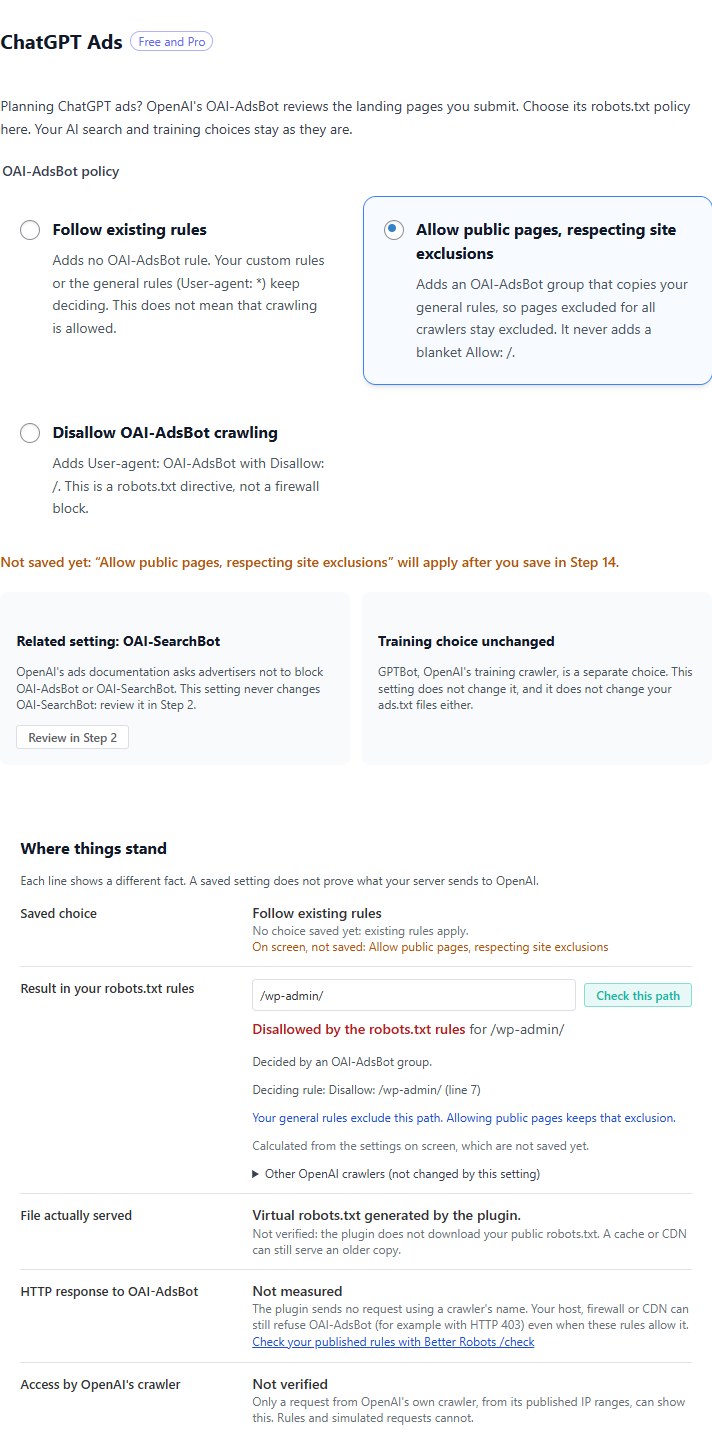
Your existing choices are kept
Installing or updating the plugin never adds an OAI-AdsBot group on its own. Until you choose an option and save, the setting reads as Follow existing rules and your robots.txt does not change. The one exception is a separate 3.1.8 fix for Pro sites that use AI content signals: the Content-signal line moves into the general User-agent: * group.
Saving has one more effect on sites still in the legacy robots.txt format, which includes a new install until its first save. Step 11 says so, and any save converts the file to the current format, whichever option you keep. Review the full preview in Step 14 before you save.
Changing the ChatGPT Ads setting does not touch your GPTBot, OAI-SearchBot or ChatGPT-User choices, your content signals, WordPress’s search engine visibility setting, or the ads.txt and app-ads.txt switches.
Conflicts are shown before anything is saved
Your custom rules (Step 13, Advanced Settings) or, in Pro, the Custom AI Crawlers list (Step 2) may already give OAI-AdsBot its own rules. The plugin refuses to save only when one of them contradicts your choice: with Allow public pages, respecting site exclusions, an OAI-AdsBot rule that is not one of your general User-agent: * rules; with Disallow OAI-AdsBot crawling, an OAI-AdsBot Allow rule. Step 11 shows that rule and its line in the generated file, and nothing is saved until you change the rule where it lives or choose Follow existing rules. OAI-AdsBot rules that agree with your choice, such as an existing Disallow when you disallow, do not block saving.
For example, a custom group that allows /private/special/ to OAI-AdsBot would still win over a new Disallow: / for that path. Rather than publish a file that only looks closed, the plugin asks you to resolve the custom rule first. Imported recommendations follow the same rule.
With Allow public pages, respecting site exclusions or Disallow OAI-AdsBot crawling, the plugin also stops when it cannot be sure what OAI-AdsBot will read. A custom group that holds only a Crawl-delay line, for example, is merged with the next group by some parsers and not by others. If the two readings give OAI-AdsBot or the general User-agent: * group different rules, the plugin saves nothing and explains that some rules are grouped differently depending on the parser. A User-agent line that mentions OAI-AdsBot without naming it on its own, such as User-agent: GPTBot, OAI-AdsBot, is refused the same way, with its line. Follow existing rules adds no OAI-AdsBot group, so these checks never block it.
What the plugin tells you, and what it does not claim
The plugin keeps five pieces of information separate:
- Saved choice: the option you saved.
- Result in your robots.txt rules: whether your robots.txt allows or disallows a path you examine for OAI-AdsBot, with the rule that applies.
- File actually served: the file served at
/robots.txt, whether the virtual file the plugin generates, the physical file it wrote, WordPress’s own file when search engines are discouraged, or a manually managed file that takes precedence. The plugin does not download your public file, so a cache or CDN can still serve an older copy. - HTTP response to OAI-AdsBot: not measured. The plugin sends no request using a crawler’s name.
- Access by OpenAI’s crawler: not verified. Only a request from OpenAI’s own crawler, from its published IP ranges, can show this.
Example: allow ad review without opening private paths
The site below is fictional. example.com runs a spring promotion at /offers/spring-sale/ and keeps /private/ out of crawling for all robots. It had chosen Disallow OAI-AdsBot crawling, then decided to advertise on ChatGPT and switched to Allow public pages, respecting site exclusions.
Before (excerpt of the file generated by the plugin):
# ChatGPT Ads (OAI-AdsBot): crawling disallowed
# Managed by Better Robots.txt
User-agent: OAI-AdsBot
Disallow: /

Sitemap: https://example.com/sitemap.xml

# Global base rules
User-agent: *
Allow: /wp-admin/admin-ajax.php
Allow: /*/*.css
Allow: /*/*.js
Disallow: /wp-admin/
# … other general rules generated by your settings …

# Custom Rules
User-agent: *
Disallow: /private/
After (excerpt of the file generated by the plugin):
# ChatGPT Ads (OAI-AdsBot): follows the general rules, site exclusions kept
# Managed by Better Robots.txt
User-agent: OAI-AdsBot
Allow: /wp-admin/admin-ajax.php
Allow: /*/*.css
Allow: /*/*.js
Disallow: /wp-admin/
# … every other rule of the User-agent: * groups, copied …
Disallow: /private/

Sitemap: https://example.com/sitemap.xml

# Global base rules
User-agent: *
Allow: /wp-admin/admin-ajax.php
Allow: /*/*.css
Allow: /*/*.js
Disallow: /wp-admin/
# … other general rules generated by your settings …

# Custom Rules
User-agent: *
Disallow: /private/
The general rules come from several User-agent: * groups: the base rules, the resources, the ads.txt files and your custom rules. The managed OAI-AdsBot group copies all of them, and the lines marked “…” stand for the rules omitted here. The plugin writes this group at the top of the file, where no other line can join it.
| Path requested by OAI-AdsBot | Before | After | Rule that decides after the change |
|---|---|---|---|
/offers/spring-sale/ (the ad’s landing page) | Disallowed | Allowed | No rule in the OAI-AdsBot group matches, so the path is allowed |
/offers/spring-sale/?utm_source=chatgpt | Disallowed | Allowed | No rule matches the path and its query string |
/wp-content/themes/example/style.css (a stylesheet the page needs) | Disallowed | Allowed | Allow: /*/*.css, copied from the general rules |
/private/ | Disallowed | Disallowed | Disallow: /private/ |
/wp-admin/ | Disallowed | Disallowed | Disallow: /wp-admin/ |
/wp-admin/admin-ajax.php | Disallowed | Allowed | Allow: /wp-admin/admin-ajax.php is longer than Disallow: /wp-admin/, so it wins |
With Follow existing rules and no other group naming OAI-AdsBot, the decisions would match the “After” column, but they would come from the general User-agent: * group rather than from a group that names the crawler.
Why the plugin does not write Allow: /
Under the robots.txt standard, RFC 9309, a crawler that finds a group naming it obeys that group only. It inherits nothing from User-agent: *. A hand-written group such as this one:
User-agent: OAI-AdsBot
Allow: /
would therefore open /private/ and /wp-admin/ to OAI-AdsBot, even though the general group closes them. Copying the general rules avoids that mistake.
The same logic protects a closed site. If the general group says Disallow: /, the OAI-AdsBot group receives Disallow: / too, and an explicit public exception such as Allow: /public/ is kept exactly. “Allow public pages” can therefore leave a landing page disallowed when one of your own exclusions covers it. The preview and the checker show which rule is responsible.
In this example, /private/ illustrates a crawl exclusion, not protection. robots.txt is public and does not stop anyone from requesting a page. Use authentication for content that must stay private.
What robots.txt cannot fix
A robots.txt file publishes instructions for cooperative crawlers. RFC 9309 states that these rules are not a form of access authorization, and they cannot override a refusal decided elsewhere. If your host, CDN, firewall or a security plugin answers OAI-AdsBot with HTTP 403, a perfect robots.txt still leaves the landing page unreachable.
Typical signs:
- the checker shows OAI-AdsBot allowed, yet the ad is rejected because the landing page cannot be reached;
- a test request presenting the OAI-AdsBot User-Agent receives 403, 429 or a challenge page while a browser receives the page;
/robots.txtitself returns an error to some requests.
The guide for an unavailable ChatGPT Ads landing page walks through the evidence to collect and the message to send your host.
Checking access from outside: three different questions
“Can OpenAI reach my landing page?” hides three separate questions. Better Robots.txt and the checker answer the first one.
| Question | How it is answered | Covered by the plugin and the checker? |
|---|---|---|
| What do my published robots.txt rules declare for OAI-AdsBot on this URL? | Reading the public robots.txt and applying the RFC 9309 matching rules | Yes: the plugin preview and the OAI-AdsBot checker |
| What HTTP response does a test request receive? | Sending a request to the landing page and recording the status, redirects and content | No. You can run that test yourself; the troubleshooting guide shows how |
| Does the real OpenAI crawler get through? | Your server or CDN logs, compared with OpenAI’s published IP list | No. Neither tool can verify it |
A test request that presents the OAI-AdsBot User-Agent is not OpenAI. Servers that verify crawlers by IP address can treat it differently from the real crawler. OpenAI publishes the IP ranges of OAI-AdsBot at openai.com/adsbot.json. The list can change, so read it at the source instead of copying it into static rules.
Free, Pro and Premium
- The ChatGPT Ads control and its preview are included in Free and Pro. This feature needs no licence.
- Premium is a plan of the Pro package, so it includes the same control.
- Importing recommendations from the free audit remains a paid feature: Pro, and Premium through the Pro package. From version 3.1.8, the import recognizes a recommendation that targets OAI-AdsBot and applies it to this same setting, after a preview. See Plugin vs /check for how the audit and the plugin work together.
- The ChatGPT Ads control does not open any other paid feature. The full comparison is on the Pricing page.
Frequently asked questions
Does allowing OAI-AdsBot get my ad approved?
No. Approval is OpenAI’s decision under its ad policies. Allowing OAI-AdsBot in robots.txt removes one declared obstacle; it does not prove that the page is reachable or that it complies with those policies.
Does ChatGPT Ads require allowing GPTBot?
GPTBot is OpenAI’s training crawler and a separate choice. OpenAI’s ads documentation names OAI-AdsBot and OAI-SearchBot, not GPTBot, as the user agents that landing pages must not block.
Should I also allow OAI-SearchBot?
OpenAI’s ad creation guide names it alongside OAI-AdsBot. Review it in Step 2, AI & LLM Governance; the ChatGPT Ads setting never changes it.
Will updating the plugin change my robots.txt?
Not for OAI-AdsBot: no OAI-AdsBot group appears until you choose an option and save. On Pro sites that use AI content signals, 3.1.8 moves the Content-signal line into the general group, a separate fix that strict parsers need.
Does this control cover other advertising crawlers?
No. It applies only to the OAI-AdsBot user agent. Crawlers of other advertising platforms are separate user agents and are not affected by this setting.
My robots.txt allows OAI-AdsBot, but the ad was still rejected. What now?
Look at the HTTP layer: a 403, a redirect or a challenge page can stop the crawler whatever robots.txt says. Follow the troubleshooting guide, then edit and resubmit the ad, or request another review, from your ads account.
Official sources
Checked on November 20, 2026. These pages can change; read them again before an important decision.
- OpenAI: Overview of OpenAI crawlers: purposes and user-agent strings of OAI-AdsBot, OAI-SearchBot, GPTBot and ChatGPT-User.
- OpenAI Help Center: Creating ads for ChatGPT Ads: landing pages must use valid links and must not block OAI-AdsBot and OAI-SearchBot.
- OpenAI Help Center: Troubleshooting common issues: rejected ads, common causes, and how to resubmit an ad or request another review.
- OpenAI Help Center: Advertiser guidance for allowing OpenAI web crawlers: further reading.
- OAI-AdsBot IP ranges: a dynamic list published by OpenAI.
- RFC 9309, Robots Exclusion Protocol: how crawlers choose a group and apply
AllowandDisallowrules.
Better Robots.txt is not affiliated with or endorsed by OpenAI. OpenAI, ChatGPT and ChatGPT Ads are named here only to identify the system this setting addresses.
Related pages
- OAI-AdsBot checker: test the rule that applies to a landing-page path.
- ChatGPT Ads website unavailable: find the layer that refuses the crawler and prepare a request for your host.
- OpenAI crawlers compared: advertising, search, training and on-demand access.
- Ads & Revenue setting: every option of Step 11.
- OAI-SearchBot checker: the search crawler named next to OAI-AdsBot.
- robots.txt declaration vs technical blocking: why a rule and a firewall answer different questions.